I’m Sciborg, but you can call me Mick! I’m a game developer, programmer, software enthusiast, and general doofus. You may know me from Stack Exchange. (Here’s a cool puzzle I made there!) I decided to make this blog to contain some thoughts, posts, dev diaries and miscellaneous bits – hence the name, Scybits!
This blog will probably contain:
Programming posts, usually inspired by things I’m doing in the workplace or issues I encounter in my side projects. I like to discuss general concepts, and I’ll try to make posts that a non-programmer can follow to learn more about code. I’m the kind of developer who loves software to the moon and back, swims gleefully in code, and absolutely despises hardware, so if I post anything about circuitry, firmware or logic gates, that will be your first signal that the Gremlins have taken me and I’ve completely lost my mind.
Game dev diaries, from my various projects and posted at varying times. Update frequency depends heavily on my motivation levels, the time of year, and whether the Great Compiler In The Sky smiles upon me, so I probably will be very sporadic about these. (I apologize for that in advance.)
I hope you enjoy my various ramblings, and I also hope you have a great day! ♥
So recently my awesome friends on Puzzling Stack Exchange taught me how to do grid-deduction puzzles – specifically, Nurikabes and Statue Parks. In the process, we accidentally discovered that solving them is my new favorite brain stim. (Which is to say, it’s super calming and nice.)
I never thought I would just have the nicest evening vibing to music and doing grid puzzles in the chat with my friends.
Because of this wonderful vibe I’ve got going on, I figured that as my first Unrelated Digression post, I would post samples from my sensory-friendly “Vibe Playlists,” the calming brain-stimming songs I listen to while I solve puzzles!
The Vibe Playlists consist of two types of songs. “Gentle Vibes” has songs with very soft, gentle beats and no bass or loud instruments, because I’m sensory-sensitive and those are the types of songs that I find calming – these are usually for when I can’t handle louder songs. “Medium Vibes” are songs that have more beat to them, and work better when I need a rhythm, but are still easy on the ears and don’t have anything too loud or bass-ish. There’s essentially no pattern to them at all – it’s a complete grab bag of genres, ages and themes.
I hope you enjoy! (I’ll probably come back and add more over time.)
Another quick reminder: This code only works for 32-bit Assembly x86 (MASM).
So now you’ve slogged through all that boring stuff with registers, and you’re ready to start storing things in those registers and working with data! Great! Welcome to hell.
How do you store data and work with registers in Assembly?
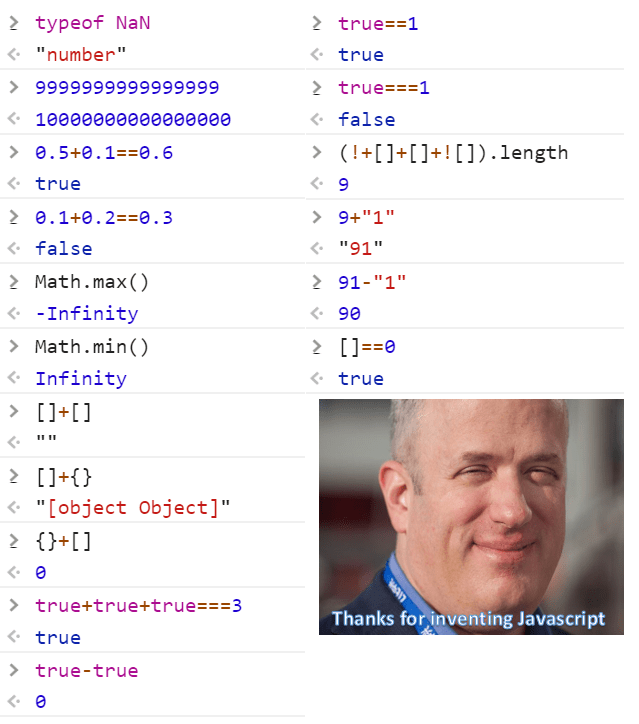
The thing about Assembly is that because it uses registers to store information, and not dedicated variables, you have to do a lot of things manually that you’re probably accustomed to having done for you in other languages. In JavaScript, this is especially true. Is your variable a string, or a number? Who cares? JavaScript doesn’t! (This, uh, might be a problem.)
Yeah, just… just look at this.
But we’re not here to torture you with JavaScript, we’re here to torture you with Assembly, so let’s get cracking!
1. Declare a Data Region
When writing Assembly code, you first declare a static data region. This is the space where you store global variables and/or constants in other languages. Pretend it’s your big cloud memory space where you shove things that you’ll use in the program later.
Data declarations in Assembly x86 are preceded by the .DATA directive:
.DATA
(your code here)
You can then declare any variables that you use in the rest of the code.
2. Use Storage Instructions
To store constants and variables in this data region, you’ll need to know three instructions:
DB – “Define Byte.”
Size: 8 bits (1 byte)
DW – “Define Word.”
Size: 16 bits (2 bytes)
DD – “Define Double Word.”
Size: 32 bits (4 bytes)
To understand how these work, imagine them as “=” signs, where different ones are appropriate in different contexts. I was confused on these when I first learned them, until I started mentally replacing them with equals signs – after which it made a lot more sense.
DB:
DB (Define Byte) is used to define 8-bit (1-byte) values. So if you would write var x = 5 in JavaScript, in Assembly you would write:
x DB 5
to declare an 8-bit number stored in location x, containing the value 5.
However, DB has one big restriction. Because you are working with 8-bit numbers when using DB, you can only use DB to store values up to 255. Keep this in mind.
Similarly, if you wanted to create an uninitialized variable – the same as just declaring var x in JavaScript – you would write:
x DB ?
to declare an empty 8-bit variable x.
DW:
DW (Define Word) is used to define 16-bit (2-byte) values. The syntax is exactly the same as with DB:
y DW 95
is equivalent to var y = 95 in JavaScript.
You really will only use DW when DB isn’t large enough to store your data, and it comes in the most handy for strings. The point of Assembly is to store as little as possible and be as lean as you can, so 99% of the time, you won’t need DW for storing numbers when DB would do just as well.
Hey, speaking of…
DD:
DD (Define Double Word) is used to define 32-bit (4-byte) values. Again, it’s the same syntax.
Just like DW, only use this when you absolutely have to. You usually won’t need it. Honestly, I’ve never used it. But it exists, so I’m covering it here.
3. Use Register Commands
Now that we’ve got a data region, we can start working with moving numbers in and out of register storage, which is the basis for everything else you do in Assembly. This is actually pretty straightforward, once you get the trick.
First of all, let’s cover a new instruction: mov.
This is the “move” command. Just like DB, DW and DD, it’s used to store things. Unlike those instructions, however, this one is specifically designed to store things in registers.
To store the x variable we created previously in the EAX register, for example, we would say:
mov eax, x
This is confusing at first, but mentally translate this to: “eax = x.” After that it becomes easier to understand what’s going on. You are literally “moving” the value of x into the register EAX.
Similarly, if I wanted to put the contents of EBX into EAX, I would say:
mov eax, ebx
There are only certain ways you can use this command that are valid, however, so keep that in mind. For example, you can’t move one variable directly into another – you need to break it up with a register transfer in between.
So now that we can store things and move things around, what do we do next?
The natural next step here is that we can do operations! And math! So that’s what we will cover next. I was going to cover strings and arrays next initially, but then I realized I don’t hate myself that much yet. Yet.
A quick reminder: This stuff only works for 32-bit Assembly x86 (MASM).
Before you can do anything in Assembly, you first need to understand the joys of registers.
…Yeah, I know. Just bear with me for these boring definitions, and then we’ll get to the fun part in the next post.
What are registers?
Registers, also known as processor registers, are small, quickly accessible memory locations that are available to your computer’s processor, with extremely fast storage and retrieval. Think of them like tiny little cubby holes, each with a unique label, in which you put things in and take things out when you need them.
Like this, but worse.
And for the purposes of Assembly, these registers are the only memory spaces you have. This is all you get. (At least until we learn some leet haxx and other tricks later.)
Also, did I mention they’re tiny? We’ll get to that in a bit.
How are registers used?
In your computer, data from larger memory areas, like your RAM, gets moved out and put into registers for two purposes: arithmetic operations, and to be manipulated by machine instructions. The results of these operations are then yoinked out of the registers and get put back into main memory for you to see.
Imagine it like this: You have to get a bunch of people from Point A to Point B. You can’t just pick up all those people and plop them down in the new spot, like magic. Instead, you have to slowly transfer one or two at a time in cars, or maybe three or four in a van, or even a dozen at a time in buses. Registers, in this analogy, are the differently sized vehicles that help get everybody from Point A to Point B, transporting little pieces at a time but building to the bigger final result.
What types of registers are there?
To explain this, you have to know that registers are measured by the number of bits they hold. This is why you might see registers referred to as “8-bit”, “32-bit”, or “64-bit” registers.
What are bits? Well, to give an extremely brief summary, a bit is the smallest possible unit of storage in a computer – i.e. a “0” or a “1.” A byte is 8 bits put together to form a unit of data, such as an ASCII letter. When I say a register is 8-bit or 32-bit, I mean that it can store 8 bits or 32 bits, respectively. Likewise, when I say a register is 1-byte or 2-byte, that means it stores that number of bytes, which are in turn made of up 8 bits each – so a 2-byte register could store 16 bits.
(If this is still confusing, just imagine bits as 0s and 1s, and each register can store a certain number of those. You honestly don’t need more than that level of understanding right now, at least until we get to strings and have to dive into bytes again.)
Okay, back to registers!
What registers are used in Assembly x86 code?
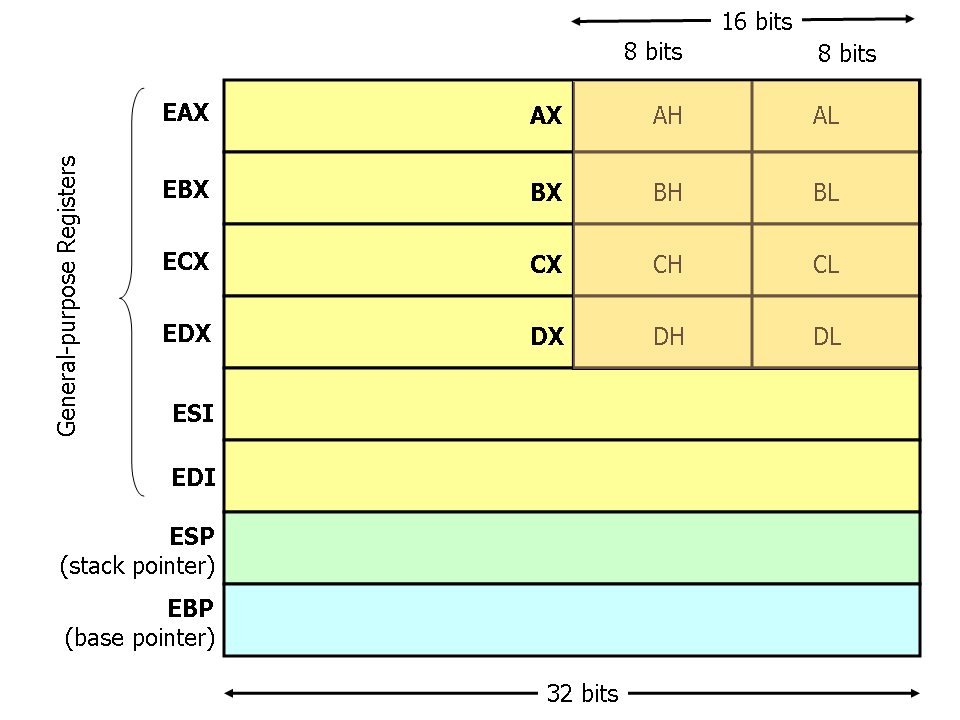
Modern x86 processors have eight (8) 32-bit general-purpose registers. Of these, four (4) are used in basic Assembly code. The other four are… weird. We’ll get to that later, too.
The four usable registers are also split into subregisters, with each 32-bit register being split into one 16-bit register and two 8-bit registers. (Since, after all, 8 + 8 + 16 = 32.) You can use either the subregisters or the overall register, depending on your needs at the time.
Registers you can use:
EAX – subsections: AX (16-bit), AH (8-bit), AL (8-bit)
ESI (source index) – usually set aside for indexing and strings
EDI (destination index) – usually set aside for indexing and strings
ESP (stack pointer) – reserved
EBP (base pointer) – reserved
Important note: When you put a new value into a register – say, DX – the values of its related registers – in this case, DH, DL and EDX – are also updated. Also note that register names are not case-sensitive. (EAX = eax.)
Here’s a helpful image to illustrate all of this before we move on:
He who hasn’t hacked assembly language as a youth has no heart. He who does as an adult has no brain.
John Moore
Wait, what is this series?
So it’s probably safe to say that Assembly has something of a… reputation among programmers. Even if you’re not a programmer, you’ve probably seen tongue-in-cheek Assembly memes floating around r/programmerhumor before.
This is pretty much accurate.
These memes are generally not very flattering. They also might give you the impression that Assembly is some kind of deep, arcane dark magic from the 1900s, bathed in the blood of old coders and baptized by Satan, and that precious few bearers of knowledge remain to pass on its secrets.
Which… isn’t too far off, to be honest? But there’s much more to Assembly than its terrible first impression. Granted, a terrible, awful, very bad first impression, but still. It’s got something to love about it, despite all the terrible things you’ve heard.
In order to explain why that is, and to introduce you to a few of Assembly’s basic concepts so that you can get a better grasp for it, let’s back up really quick and define what Assembly languages actually are.
What is Assembly?
Assembly languagesare extremely low-level programming languages, basically one step above the hardware. Imagine that languages like Ruby, Clojure and Perl are floating somewhere high up above the CPU, and Assembly, before being translated into even simpler machine code, is the one doing the work down below. It’s the belated coal miner of the programming language family, and… yeah, I won’t lie, it’s pretty ugly. It’s easy to look at a sample of Assembly code and flinch violently away, like it will infect your neurons with an Atari-era degenerative disease if you absorb too much of it at once.
GAHHHH!
But overcome the eyesore and your instinctual anguish, if you can, and try to look past it while I explain some more about it.
Now, you might be wondering (while you struggle to recover), why do I say languages and not language? The answer is simple: there are a lot of them! While there is technically only one Assembly language, there are several “flavors” of Assembly that use different syntax and vocabulary, each one designed for a specific type of processor. So, for the purposes of this post, I’m going to treat each one as its own “language,” even if technically they are all the same thing.
The flavor I’m going to be covering today is the one that I was all but forced to learn in college: 32-bit Assembly x86(MASM). It’s the Microsoft Macro Assembler version, but other versions exist, and we can cover those in a later post.
Where do you even learn Assembly nowadays?
If you went to college for computer science, you probably had to take one of those mandatory low-level courses that covered programming close to the hardware – for me, it was called something like “Applications and Systems.” Maybe you had to learn a flavor of Assembly outright, like I did, or maybe you just did some fiddling around with C and low-level memory allocation. Either way, though, if you are a computer science student or a graduate, you have probably encountered this beast before.
And I’m guessing that, like me, you hated it.
Because honestly, we live in 2020, don’t we? We’re in a modern world, full of beautiful, elegant, sexy high-level languages that whiz along happily and don’t even need top-level compilers anymore – all the cool kids on the block use line-by-line interpreters now, Dad. Furthermore, memory allocation and garbage collection, unless you really get into the nasty parts of languages like C/C++ and work your fingers around in their guts, are pretty much a relic of the past, right? I mean, you probably haven’t seriously called malloc or manually jiggled around with pointers since… well, college.
That obviously begs the question. Do we even need to know this kind of deep, low-level, unintuitive and snarly hardware stuff anymore? Why can’t we just write a bunch of fun code without necessarily knowing every step of how it works, from assembler to compiler to the computer screen?
Maybe you can. Or at least, maybe you won’t ever need to know this kind of gnarly machine code personally. But stop for a moment, hypothetical reader. All of these lovely high-level languages, like Python and Ruby – they have to be built on top of something, right? They can’t just stand on nothing, like buildings without a foundation.
Guess what they’re made out of.
In fact, guess what almost all software in the world is made from, when you really get down to brass tacks.
That’s right. Assembly languages.
…Well, okay, technically modern CPUs don’t run pure Assembly, but rather machine code. But since there is a one-to-one correspondence between machine code and Assembly, and for the purposes of keeping the scope of this post reasonable, we’re going to gently avoid that and push it out to sea for a future post.
But why should I learn Assembly?
If you are a software developer, no matter how comfortable you are with low-level code or how little you think you’ll ever need it, I think you should learn at least a little bit of Assembly. Maybe just enough to output a message, or store some numbers and perform basic addition. You don’t need to write a symphony, or recreate Final Fantasy V or anything – just a little multiplication or palindrome program will do.
I think you should learn Assembly for a couple of reasons.
It gives you a better idea of how computers work, and gives you complete control over your computer’s resources. It doesn’t matter how experienced you are – sometimes we all look at that mysterious blinking box on our desks, with its peacefully whirling fans and panting GPU, and we wonder what the hell is going on in those happily clicking electric guts. Once you work in Assembly, you’ll have a much clearer picture of your computer’s inner workings, and that’s useful to anyone who’s interested in programming or engineering. It teaches you about registers, CPU instructions, and much more. You’ll also have access to literally everything, and while that can be terrifying, it’s absolutely fantastic as a learning experience.
It helps you understand other low-level languages, and optimize for speed and performance. If you’ve ever had weird, mysterious memory issues or struggled madly with pointer operations while working in the deeper parts of C, you’ve already felt the pain of not quite getting how all this allocation stuff is supposed to work. Learning Assembly helps you get a better grasp on what’s actually going on when your computer is assigning and clearing memory, and why memory management is so important. Similarly, learning such a deep language is excellent for teaching you a bunch of speed tricks for your other languages, and showing you things on the per-instruction level – like, say, concurrency issues.
And, perhaps most importantly:
Sometimes you just need to suffer in life.
So, without any further ado…
Introduction to Assembly x86
As I write more posts in this series, I’ll expand the list below. It’s recommended that you read them in order, but you can jump around. And, as another reminder: This is the MASM version, so don’t confuse it for other versions.





 Scybits